I wanted a note-taking app that did one thing well: let me write immediately, without forcing me to create an account, pick a pricing plan, or wait for a server to respond. Everything else - cloud sync, sharing, billing - would be optional layered on top.
This post covers the architectural decisions behind stdnotes: why I chose each piece of the stack, how the offline-first design works at the implementation level, and what I'd do differently next time.
The Problem I Was Solving
Most note apps are cloud-first. Your notes don't exist until they're on a server. If you're on a plane, in a basement, or behind a corporate proxy, you're blocked. And every one of them requires an account before you can type a single character.
I wanted to flip this: start offline by default, opt into the cloud later. The mental model is simple:
- Open the app → write immediately
- Notes live in IndexedDB (your browser's built-in database)
- Sign in with Google whenever you want → notes sync to Firestore
- Never signed in? Your notes are still there, every time you open the app
This sounds obvious, but it has real architectural consequences that ripple through the entire codebase.
Architecture Overview
flowchart LR
    user((User))

    frontend["Frontend<br/>Next.js"]
    indexeddb[("IndexedDB<br/>Offline Store")]
    backend["Backend API<br/>Fastify"]
    firestore[("Firestore<br/>Cloud Database")]
    auth["Firebase Auth<br/>Authentication Service"]

    user --> frontend

    frontend <-->|HTTP / REST| backend
    frontend <-->|WebSocket<br/>Live Sync| backend

    frontend <-->|Read / Write<br/>Offline Cache| indexeddb

    backend <-->|Read / Write| firestore
    frontend -->|Sign in / Session| auth
    backend -->|Verify Auth Token| auth

    classDef app fill:#eef6ff,stroke:#2563eb,stroke-width:1.5px,color:#111827;
    classDef db fill:#f0fdf4,stroke:#16a34a,stroke-width:1.5px,color:#111827;
    classDef service fill:#fff7ed,stroke:#ea580c,stroke-width:1.5px,color:#111827;
    classDef user fill:#f5f3ff,stroke:#7c3aed,stroke-width:1.5px,color:#111827;

    class frontend,backend app;
    class indexeddb,firestore db;
    class auth service;
    class user user;
The stack is a TypeScript monorepo with three workspaces:
stdnotes/
├── frontend/   → Next.js 15 + React 19
├── backend/    → Fastify 5 + firebase-admin
└── packages/shared/  → shared TypeScript types, constants
The key architectural constraint: the frontend never talks to Firestore directly. There is no Firestore client SDK in the browser. All database operations go through the Fastify backend, which uses the Firebase Admin SDK. This keeps auth enforcement in one place, prevents client-side rule bypasses, and makes the frontend portable to any database backend.
The Dual Storage Backend
The offline-first requirement forced me to design a clean abstraction for storage operations early on. I ended up with a Backend interface that both the online and offline implementations satisfy:
interface Backend {
  createNote(note: Partial<Note>): Promise<Note>;
  updateNote(id: string, patch: Partial<Note>): Promise<void>;
  deleteNote(id: string): Promise<void>;
  subscribeNotes(cb: (notes: NoteMeta[]) => void): Unsubscribe;
  // ... folders, settings, etc.
}
Offline backend (createOfflineBackend): reads and writes to IndexedDB via the idb library. Subscriptions use a local pub-sub emitter - when you create a note, subscribers are notified synchronously.
Online backend (createOnlineBackend): sends HTTP requests to the Fastify API and subscribes to real-time updates via WebSocket streams.
The workspace context picks which implementation to use based on auth state. React components never know which backend is active - they just call backend.createNote() and it works in both modes.
// Inside workspace-context.tsx
const backend = user
  ? createOnlineBackend(apiClient, authToken)
  : createOfflineBackend(idbStore);
This design means switching from offline to online mode is a context update, not a data migration. The note list re-renders with cloud data; local IndexedDB data is preserved for manual migration later.
Content Compression with lz-string
Storing thousands of notes in IndexedDB (and later in Firestore) made me think about size. A rich-text note with some formatting can easily be 5–15 KB of HTML. Over 1,000 notes, that's 5–15 MB in the browser's storage quota.
I chose lz-string for UTF-16 compression. The key reason over alternatives: it produces a regular JavaScript string (no binary blobs), which works seamlessly in both IndexedDB and Firestore without any special serialization.
The compression is applied transparently on write:
function compress(content: string): string {
  if (content.length < 64) return content; // not worth compressing short strings
  const compressed = LZString.compressToUTF16(content);
  return 'lz1:' + compressed; // prefix identifies compressed strings
}

function decompress(stored: string): string {
  if (!stored.startsWith('lz1:')) return stored;
  return LZString.decompressFromUTF16(stored.slice(4)) ?? stored;
}
Typical results: ~60–70% size reduction on rich-text HTML, ~50% on Markdown. The backend never decompresses content - it treats it as an opaque string and passes it through. Decompression happens only in the browser.
Real-Time Sync via WebSocket Streams
Once a user signs in, their notes need to update in real time across devices. I chose WebSockets over polling for the obvious latency reasons, but the implementation has some interesting details.
The backend exposes stream endpoints like /stream/notes and /stream/folders. Each sends an initial snapshot event with all current data, then added, modified, and removed events as Firestore changes come in:
// backend: routes/stream/notes.ts
fastify.get('/stream/notes', { websocket: true }, async (socket, request) => {
  const uid = await verifyToken(request);
  const heartbeat = setInterval(() => socket.send(JSON.stringify({ type: 'ping' })), 25000);

  const unsubscribe = db.collection(`users/${uid}/notes`)
    .onSnapshot(snapshot => {
      // send initial snapshot
      if (snapshot.metadata.fromCache === false) {
        socket.send(JSON.stringify({ type: 'snapshot', data: snapshot.docs.map(toNote) }));
      }
      // then send incremental changes
      snapshot.docChanges().forEach(change => {
        socket.send(JSON.stringify({ type: change.type, data: toNote(change.doc) }));
      });
    });

  socket.on('close', () => { clearInterval(heartbeat); unsubscribe(); });
});
The frontend reconnects automatically with exponential backoff on disconnect. The 25-second heartbeat prevents proxy timeouts (most proxies close WebSocket connections idle for >30 seconds).
Three Editors, One Storage Format
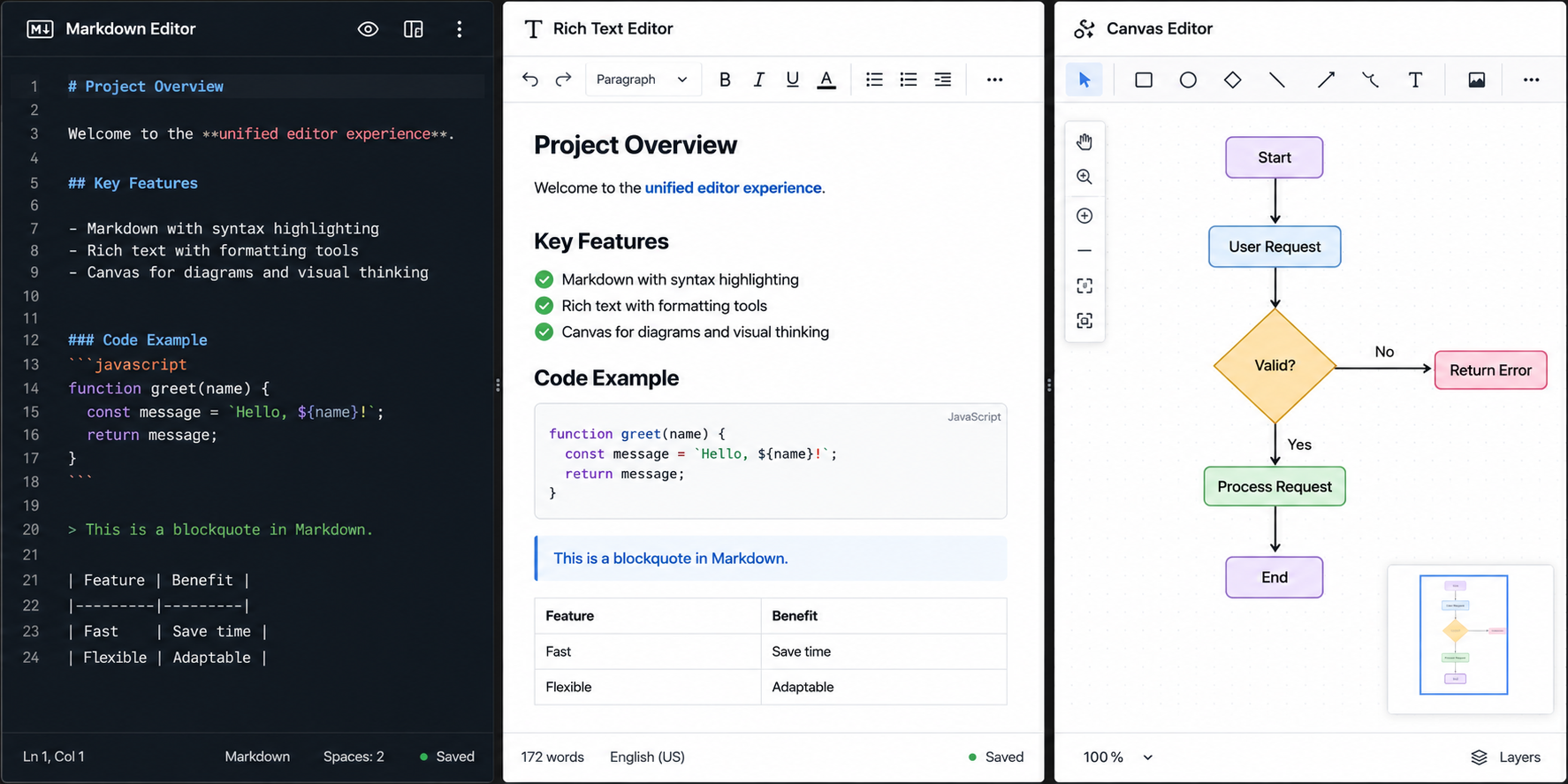
Notes have a contentType field: richtext, markdown, or canvas. The storage layer doesn't care - content is always a compressed string. The editors handle their own serialization.
Rich Text: TipTap
TipTap wraps ProseMirror with a React-friendly API and a rich extension system. I chose it over Lexical because the extension ecosystem is more mature (tables, task lists, code blocks with syntax highlighting all work out of the box).
Content is stored as HTML. The tricky part: TipTap's HTML isn't always round-trippable to Markdown, so exports use Turndown with custom rules for task lists and tables.
Markdown: CodeMirror 6
CodeMirror 6 is the right choice for a Markdown editor because it's lightweight, extensible, and has first-class syntax highlighting via @codemirror/lang-markdown. I added a toggle between edit mode and a rendered preview (via react-markdown + rehype-sanitize for XSS protection).
// The preview uses rehype-sanitize to strip script tags and event handlers
<ReactMarkdown
  remarkPlugins={[remarkGfm]}
  rehypePlugins={[rehypeSanitize]}
>
  {note.content}
</ReactMarkdown>
Canvas: Excalidraw
Excalidraw is essentially a full drawing application you can embed in a React component. Canvas notes store JSON ({ elements, appState, files }) as their content - same compression pipeline as the other content types.
One useful feature: canvas drawings can be inserted as images into rich-text notes. Excalidraw exports SVG/PNG via its built-in API, and TipTap's image extension handles the insertion.
Wiki-Links and the Knowledge Graph
The [[Note Title]] syntax is implemented as a custom TipTap node (for rich text) and a CodeMirror decoration (for Markdown). An alias form [[Title|display text]] lets you show custom link text without changing the target. When you type [[, a typeahead popup appears with matching note titles.
The knowledge graph at /graph is a force-directed SVG layout built without an external graph library. Each note is a node; each [[link]] creates an edge. I computed the layout with a basic force simulation (attraction along edges, repulsion between all nodes, damping):
function simulateStep(nodes: GraphNode[], edges: GraphEdge[]) {
  // repulsion: push all nodes apart
  for (let i = 0; i < nodes.length; i++) {
    for (let j = i + 1; j < nodes.length; j++) {
      const dx = nodes[j].x - nodes[i].x;
      const dy = nodes[j].y - nodes[i].y;
      const dist = Math.sqrt(dx * dx + dy * dy) || 1;
      const force = REPULSION / (dist * dist);
      nodes[i].vx -= (dx / dist) * force;
      nodes[j].vx += (dx / dist) * force;
      // ...
    }
  }
  // attraction: pull linked nodes together
  edges.forEach(edge => {
    // spring force along each edge
  });
  // apply velocity with damping
  nodes.forEach(n => { n.x += n.vx * 0.8; n.vx *= 0.9; });
}
Avoiding a third-party library kept the bundle small and gave me full control over the visual style.
Version History
Version snapshots are stored in a Firestore subcollection: users/{uid}/notes/{id}/versions. A new version is captured when:
- The note content changes by more than 500 characters, and
- At least 5 minutes have passed since the last snapshot
This throttling prevents a snapshot on every keystroke while still capturing meaningful checkpoints. A FIFO eviction policy keeps at most 20 versions per note - when a 21st version is written, the oldest is deleted in the same Firestore transaction.
async function maybeCreateVersion(uid: string, noteId: string, note: Note) {
  const versions = await getVersions(uid, noteId);
  const latest = versions[0];
  const deltaChars = Math.abs(note.content.length - (latest?.content.length ?? 0));
  const minutesSince = latest ? (Date.now() - latest.savedAt.toMillis()) / 60000 : Infinity;

  if (deltaChars < 500 && minutesSince < 5) return;

  const batch = db.batch();
  batch.set(versionRef, { ...note, savedAt: Timestamp.now() });
  if (versions.length >= 20) {
    batch.delete(versions[versions.length - 1].ref);
  }
  await batch.commit();
}
Public Sharing and Vanity URLs
Any note can be made publicly readable via a toggle. Sharing options include password protection, link expiry (24h / 7d / 30d / never), and a custom vanity slug. The sharing state is stored on the note document (shared: true) and enforced in Firestore security rules - unauthenticated requests can read a note only if shared == true and the share hasn't expired.
Vanity slugs (/s/my-custom-slug) are stored in a separate top-level Firestore collection (share_slugs/{slug}) mapping to (uid, noteId). The backend resolves the slug and returns the note in a single request.
// Firestore security rule for public note access
match /users/{uid}/notes/{noteId} {
  allow get: if resource.data.shared == true
             && (!('shareConfig' in resource.data)
                 || !('expiresAt' in resource.data.shareConfig)
                 || resource.data.shareConfig.expiresAt == null
                 || resource.data.shareConfig.expiresAt > request.time.toMillis());
}
Workspace Export as a Background Job
Exporting an entire workspace (potentially thousands of notes) can take minutes. Blocking the HTTP request isn't an option. Instead:
- Frontend calls
POST /exports→ backend creates anexport_jobdocument in Firestore with statusqueued - A separate export worker process polls Firestore for queued jobs
- Worker decompresses each note, converts to Markdown/HTML, bundles as a ZIP
- ZIP is uploaded to Cloud Storage; a signed download URL is written back to the job document
- Frontend streams progress via the
/stream/exportsWebSocket endpoint
Frontend → POST /exports → Firestore: export_job (queued)
                                          ↑ polls
                                     Export Worker → ZIP → Cloud Storage
                                          ↓ writes downloadUrl
Frontend ← WebSocket stream ← Firestore: export_job (done, downloadUrl)
The worker runs as a separate Node process. This keeps the Fastify API stateless and prevents long-running jobs from blocking the event loop.
Billing: Two Payment Providers
I integrated both Stripe and Lemon Squeezy as payment options. The subscription state is normalized into a single subscription object on the user document, regardless of provider:
interface Subscription {
  plan: 'free' | 'pro';
  status: 'active' | 'trialing' | 'past_due' | 'canceled';
  provider: 'stripe' | 'lemonsqueezy' | null;
  customerId: string | null;
  subscriptionId: string | null;
  currentPeriodEnd: number | null;
  cancelAtPeriodEnd: boolean;
}
Webhook handlers for both providers normalize their payloads into this shape and write it to Firestore. Idempotency is enforced via stripe_events and ls_events collections - before processing any webhook, the handler checks if the event ID has already been processed.
Having two providers adds maintenance surface area, but it gives payment method flexibility without rewriting the frontend or data model.
Update (v7.0.0): The Pro plan was removed and all features - version history, image uploads, sharing, workspace export, cloud sync - are now free. The billing infrastructure (webhook handlers, Firestore subscription documents) is retained in the backend but no checkout or upgrade UI is exposed to users.
Design Decisions I'd Revisit
Firestore as the backend database: Firestore's real-time capabilities are excellent, but the cost model and the lack of arbitrary server-side queries (no JOIN, limited aggregation) can be constraining. For a future version, I'd evaluate PocketBase or a Postgres-backed alternative.
No end-to-end encryption: Notes are encrypted at rest by Firestore, but Firestore can read them. For a truly private note app, client-side encryption (encrypting before sending to the backend) would be necessary. This is a significant architectural addition - key management, no server-side search - but it's the right answer for users who care about privacy.
Rich text stored as HTML: HTML is flexible but brittle for round-tripping. A structured document format (ProseMirror JSON, or similar) would be a more reliable base for export and transformation.
No real-time collaboration: The current model is last-writer-wins. Two devices editing the same note simultaneously will lose one version. CRDT-based merging (e.g. Yjs) would solve this, at significant complexity cost.
What I Learned
The biggest lesson: the offline-first constraint was a forcing function for good architecture. Because I had to design a storage abstraction from day one, the codebase ended up with clean separation between UI, state, and storage. The dual backend design made testing easier and the app more resilient.
The content compression was a late addition, but it turned out to be more impactful than expected - not just for storage, but for WebSocket message size and Firestore document read costs.
Finally, building a note app from scratch gave me deep appreciation for how much invisible complexity lives in "just a text editor". Autosave with debounce, cursor position preservation across content updates, Markdown shortcut detection, image paste handling - these are each their own small rabbit holes.
Stack Summary
| Layer | Technology | Why |
|---|---|---|
| Frontend | Next.js 15 + React 19 | App Router, SSR, mature ecosystem |
| Backend | Fastify 5 | Fast, TypeScript-native, great plugin system |
| Database | Cloud Firestore | Real-time subscriptions, managed scaling |
| Storage | Cloud Storage | Images, export ZIPs |
| Auth | Firebase Auth | Google sign-in, ID token validation |
| Rich text editor | TipTap (ProseMirror) | Best-in-class React integration, extension ecosystem |
| Markdown editor | CodeMirror 6 | Syntax highlighting, lightweight, extensible |
| Canvas editor | Excalidraw | Complete drawing app, active community |
| Offline storage | IndexedDB (idb) | Browser-native, no quota surprises |
| Compression | lz-string | UTF-16 strings, works in IndexedDB + Firestore |
| Styling | Tailwind CSS | Utility-first, flat design system |
| Shared types | TypeScript monorepo | Single source of truth for Note, Folder, etc. |
| Billing | Stripe + Lemon Squeezy | Provider flexibility (webhook infra retained; Pro plan removed in v7) |
If you're building something similar - an offline-first app with optional cloud sync - the dual backend abstraction is the pattern I'd reach for first.
App URL: https://stdnotes.app